Thursday, January 10, 2008

Working with LINQ to SQL and WCF Services (Part 1)

As James has already posted here there are concerns circulating around the web about the lack of any coherent guidance in terms of a good approach to using LINQ to SQL (or Entities for that matter) in an n-tier architecture. One of the issues I've been fretting over is what I refer to as the "types and references" issue, namely that with the approaches described in the MSDN articles covering the topic there's no real explanation as to how the entity types generated by the IDE from the dbml file can be consumed as deserialised entities on the client side without creating some kind of code "disconnect" between LINQ entities which are generated automatically from the DB schema and a different set of definitions which can be used by the client.

There are various possible solutions to this, many of which look promising at the start but ultimately end up being dead ends or not really practical. One approach that I have been able to get to work is outlined below. What we're going to do in this first part is simply create aWCF Service component which will return a list of Customers from the Northwind database and consume that component in a simple client.

The Data Component
1. To start, we fire up Visual Studio 2008 and create an empty Solution. To that we want to add a Class Library project which we'll call NorthwindData.

2. Next, we add a dbml file to the project by going to "Add New" and selecting the "LINQ to SQL Classes" entry and call it Northwind.dbml. Then use Server Explorer to navigate or connect to your SQL Server and drag the Customers table onto the dbml designer surface from the Northwind database.


3. We now want to add a partial class so that we can add our own code to the generated DataContext. So add a new Class file and add the following code which will provide a method which returns all customers.


The WCF Service

4. So far so good. But now it's time to create our WCF Service component. So add a New Project to the solution and select WCF Service Library, we'll call it NorthwindService. We now need to make a few changes to the service framework that VS has created for us. First we need to add references to the NorthwindData project and to System.Data.Linq. Then we need to change the default Interface and Service names etc so that they are a bit more meaningful for our purposes. To do this we first rename the IService1.cs file to INorthwindService.cs (when you are asked to rename all references say Yes otherwise you will have to change the name of the actual interface yourself too.)

In WCF, Service interfaces are defined as "Service Contracts" and are marked with the ServiceContractAttribute, the methods on those interfaces are marked with the OperationContractAttribute. What this basically does is specify that the interfaces and marked operations define a contract that is upheld by any service which advertises itself as implementing that interface. If you've done much work with web services then you'll be quite at home with this concept as what it is effectively doing is decorating the interface so that our service can advertise and describe itself in a way synonymous with the WSDL approach. At the moment we're only interested in returning one list of Customers so our contract is relatively simple. The interface should be defined as follows:


5. The next simple step is to provide an implementation of the interface in our component, so we rename Service1.cs to NorthwindService.cs (again allow VS to rename all references etc) and change the implementation code to the following:


6. Finally to make our service useable, we need to update the config file so that the changes we have made to the names of the interfaces etc are registered correctly when the WCF Service is hosted. Open the App.Config file and change the contents to match the following:
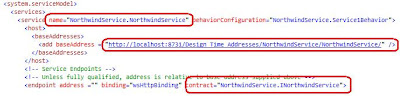


7. At this point, we only have one more tiny problem with our service. In point 4 we learned that interfaces exposed by WCF services specify a "contract" and this is also extended to any data objects which are passed through that interface, this is done using the DataContractAttribute (and the associated other attributes which define the members on the entity class.) So how do we get the entity objects generated by the IDE to be decorated with the required interfaces. This took a considerable amount of digging but in the end turned out to be a remarkably simple task. If we go back to our NorthwindData project and go to the properties of the dbml in the designer we can see a property called Serialization Mode. All we have to do is change the setting to "Unidirectional".
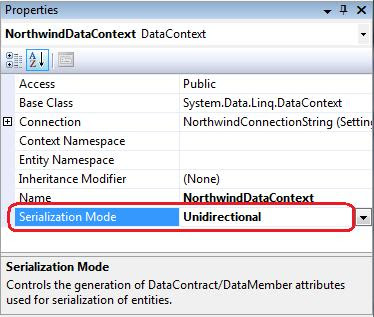


What this then does is automatically marks any of the entities generated from the dbml with the DataContract attributes.



It also means that the data definition of the entities can be included in the service definition of the interface contract. In a practical sense what this does is allow us to add a reference to the service and Visual Studio 2008 (utilising svcutil.exe under the hood) will read the metadata for the service and generate a client-side service proxy containing definitions of the LINQ entities for us.

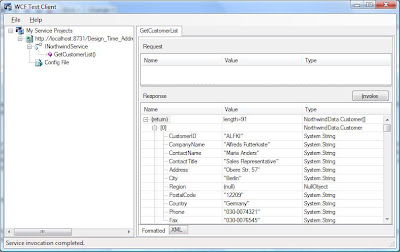
8. Let's test our service. Right-click on the NorthwindService project and select "Debug->Start New Instance..." This should force a compile and run the WCF Service which will be hosted by default in the "WCF Service Host" application which will place an icon in the notification area. If the service has been configured correctly the WCF Test Client should launch and after a second or so your service should be loaded into the tree view on the left. You can then expand the tree nodes to see the structure of the Service Interface and double click on the "GetCustomerList()" node. This will open a tab on the right which has an "Invoke" button which, when clicked, will call the method on the service and display the results in the lower box. As you can see below, the call returned 91 customer entries.


The Simple Client

8. To create our simple client we'll add a console application project to our solution. This will serve our purposes in Part 1 as we're just interested in getting a list of customers back from the database but in future parts I hope to create a more complex and useable client using WPF. Add a console project called SimpleClient then right click on the References node in Solution Explorer and select "Add Service Reference..." If everything has gone right, you should be able to click the "Discover" button and the service details should appear in the tree on the left. When you expand the node, the service is instantiated and you can navigate to the interface definition. Before we commit the reference, change the Namespace entry at the bottom to Northwind. Finally, by default collections appear in the proxy as arrays, to make them a List as defined in the interface we need to click on the "Advanced..." button and change the "Collection Type:" dropdown to "System.Collections.Generic.List".
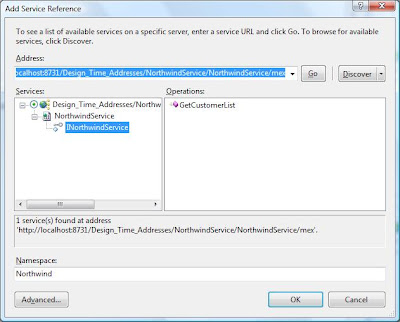


9 Click OK in the dialog, and the service reference will be added to the project. We can then add the following code to the Main method in Program.cs:
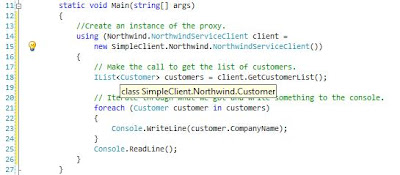


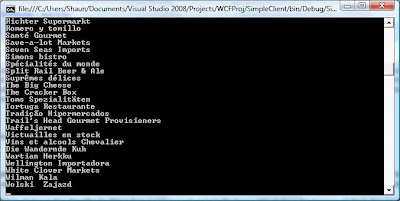
To test the simple application, ensure an instance of the service is running in the WCF Test Client (if one isn't, then right click the service project and select "Debug->Start New Instance".) then start an instance of the console application. All things being well, you should have a console window with a list of Northwind customers displayed.


Summary

So this is where we'll leave it for now. What we've achieved is fairly simplistic but what we have is an overall framework upon which we can build more complex behaviours such as updates and creation.


How good are your .NET coders?

Being a contractor is a balancing act. There are some positives, but just as many negatives. One of the positives, is that you see an awful lot of code. Exposure to code you haven't written is a great way to learn. You can pick up some tricks, or just as likely, see an implementation that is really bad and you get a chance to think how you would do it better. Unfortunately, most contractors never get a chance to fix the problems with code. Permies can be threatened by contractors and don't like you messing with their code.

It's understandable. They don't know how good you are or aren't, so why let this new guy loose on their code.

Anyway, this is absoultely nothing to do with the topic of this post. I just wanted to elaborate that I have seen a lot of codebases over the years. A lot.

The overwhelming conclusion I have found recently is this: If your developers have come from a certain background, say C++ or VB, don't assume they are going to be great C# coders off the bat.
The biggest problem I see is people move away from C++ and VB and instead of understanding and learning C#, they just apply their language X knowledge to C#. What comes out is a hybrid mess of ugliness.

Code that is not quite OO, not quite procedural, not quite anything actually.

So, if you are a development shop looking to move to .Net: take time to actually learn the language. Don't just assume that it's C++ with a garabage collector, or VB with curly braces. It's a bit like assuming that French is just English with an accent, and a vague hint of garlic.

Stop Vista's Update Auto-Reboot, permanently!

It's a story with Vista and XP that has played out over and over again across the lands. So you've been working away at some stuff, some word docs here, some bits of code there and some of all of it may or may not be in a position where you want to hit the Save button or do a "Save As" but hey never mind you're off out for a few hours...

...while you were out, Win
dows Update helpfully downloaded and installed a couple of fixes for your machine and now it needs to reboot the machine in order to complete the update. This is all fine but you're not there, and so Vista pops up a dialog giving the user the option to "Restart Now" or "Postpone" and a little countdown timer. When the timer hits 0 your box will restart automatically.

The number of times in the past I've come back from being out to see that login screen staring at be smugly and then logged in only to notice that it's actually "Logging In" rather than being "Unlocked" (the no apps running in the taskbar is a clue.)

It makes me SO angry, how many of these updates are SO IMPORTANT that they need to be fully applied to the machine RIGHT NOW??? Are there really hoards of 1337 barbarian hackers out there just waiting to take advantage of some vulnerability in CALC.EXE??? No, it's one of those broad stroke, treat all users like they're idiots policies that MS seem to adopt occasionally with security.

Anyway,
a while ago I found a solution, but I keep forgetting what it is and after doing a google search yesterday to try to track it down again I found a lot of dangerously incorrect advice on various blogs, the worst of which were people advising that users disable automatic updates altogether This, is wrong! So in the interests of having the info somewhere I know I can find it, and in the hopes that it might be useful to others I'm going to describe what I like to call the "middle ground approach". That being, you still get the prompts by Vista, and you can postpone the prompts for 10 minutes or 4 hours and after that time it will nag you again but it WILL NOT automatically reboot your machine and cause that "blood draining from face" moment you get when you realise that you've lost half a days unsaved work.

Anyway it's quite simple.
  1. Go to the start menu, and in the search type "gpedit.msc" Then hit enter. The Group Policy Object Editor should appear.
  2. Navigate to "Computer Configuration\Administrative Templates\Windows Components\Windows Update"
  3. In the list on the right look for the following setting: "No auto-restart for scheduled Automatic Updates installation." Double-click this and change the configured value to "Enabled" then click OK.
From now on when Vista needs a reboot you will be prompted with the following dialog:


It's worth noting two things though:
  • If you're on a domain, it's likely that domain policies will override anything you set here even if you are allowed to access the setting in the first place.
  • It appears that when the dialog pops up, it gets focus and the "Restart Now" button is highlighted. So if you're typing and you happen to hit "Enter", "Space" or "n" it will be effectively clicking the "Restart Now" button...

Wednesday, January 09, 2008

Vista SP1 - The Windows Update route

As a self proclaimed "windows guy" I'm really looking forward to the arrival of Service Pack 1 for Vista. As has already been posted here one of the most eagerly awaited improvements are in the networking and file transfer stacks. I have quite a few boxes on the wlan at home and I've taken to transferring large numbers of files using an external disk which is hardly ideal. MS have published information about the contents of the SP1 release here and by all accounts local network file copies should have the following improvements:
  • 25% faster when copying files locally on the same disk on the same machine
  • 45% faster when copying files from a remote non-Windows Vista system to a SP1 system
  • 50% faster when copying files from a remote SP1 system to a local SP1 system
They've also fixed issues with the estimated time to complete which was something that really got me wound up at times.

Other fixes that interest me are:
  • Improves power consumption and battery life.
  • Improves the speed of adding and extracting files to and from a compressed (zipped) folder.
  • Improves the speed of copying files, folders, and other media.
  • Improves startup and resume times when using ReadyBoost
Now under normal circumstances, I would be first in line at the MS download site to get the SP when it becomes available but apparently the downloadable package comes in two flavours one with 5 language packs embedded and the other with all available language packs. These top out at 450MB and 550MB in size respectively.

An alternative to downloading the full thing, particularly if you're the sort of user who keeps his machine up-to-date with fixes is to just let Windows Update (Microsoft Update) apply the Service Pack, apparently this weighs in at a much nicer and lightweight 65MB as it is able to detect what fixes have already been installed and will apply the bits that haven't.

Do you have DADD?

Are you like me? Do you tend to drift off and play around when you are doing something that either doesn't challenge or interest you?

If so, then you have DADD or Developer Attention Deficit Disorder!

I can't claim this as my own I heard it on the latest Polymorphic Podcast. Well I sort of modified it a little but you get the jist.

Tuesday, January 08, 2008

Enjoy what you do?

I have a couple of questions for you.

1) On a Sunday night, are you dreading going to work on Monday?
2) Do you look at the clock every 5 minutes waiting for the time to leave?
3) Are you bored?

If you answered yes to any of those questions above, why?

Software Development should be about passion. You should love what you do, look forward to going in, and when doing it not even realise it’s been 4 hours since you last looked up. Right? Right?

I firmly believe that if you don’t enjoy what you are doing, then you shouldn’t be doing it. It amazes me how people stick in a job they hate just because it is comfortable, or they don’t like change.

If you hate your job, do yourself a favour. Get another one. You wouldn’t spend 40 hours a week bashing your head with a hammer, so why have the same feeling in a sucky job?

I know a lot of people don’t like change. They don’t like having to learn new processes, or meet new people – that awkward few weeks where everybody asks you the same question. I guess deep down, some people are scared that they aren’t as good as they think and could be shown up in a new job?

I’m a contractor and change jobs, on average, every three or four months. If you choose to look at change as a positive, growth experience, and get excited about becoming a better developer, or share your knowledge with others, then it can be a positive thing.

Make 2008 the year you find the passion for development again.

Another year, another resolution

Well, that’s another year buggered. It’s been a pretty big one for us personally. My more regular (or antipodeans) readers will know that my wife, daughter and I packed up sticks and moved to the Uk in March. It’s been a pretty big change, and save for a few moments of reoccurring home sickness (well NZ IS the best country in the world) it’s been a pretty good year. I feel I have grown as a developer, and have seen some awesome things, and met some pretty cool people. I expect this year to be just as big a year from a personal growth point of view.

Except in one area - Weight.

Over the past three or four years I have managed to go from around 85kg to 105kg which is where I was at last weigh in. There are a couple of key reasons for this I think. First and foremost is I’m not exercising as much as I used to. I used to cycle up to 10 hours a week at my peak. I think I would have ridden my bike 30 or 40 times in 2007. Bad.

The other is a combination of laziness, a liking of sweet things and convenience. Oh and the bloody British habit of having a vending machine in every work place!

That was then, this is now.

I think resolutions are rubbish. It’s easy to SAY you will do something, and then trip up. Trust me, I’ve done it. As I’m sure most people have. So, I am not going to make a resolution. I going to give my word (to myself) that I will do the following this year:

I will stop eating the following:
Chips (crisps)
Biscuits
Anything chocolate related
Reduce beer intake, if drinking then try Bubbly or Whiskey/Bourbon
Reduce portion sizes for evening meal

I will get at least 4 forms of exercise per week. Before Xmas I was doing a bit of running so intend to keep that up, and maybe dust off the elliptical trainer.

As my word is my bond I will stick by what I start.

I guess at this point I need a goal. I’m not going to make the mistake of setting a target weight. It’s too easy to either get discouraged, or complacent. My initial goal is to commit – truly commit to the above for one month and take it from there. I think I will use the cold turkey approach, rather than the weight watchers approach of rewarding success. So for the next month, good bye to all rubbish food, and hello running shoes.

I’ll report back in a month. Feel free to join with me on this endeavour. All it needs is a strong will.

Monday, January 07, 2008

Pre Mac World 2008 Rumour #1

A docking station / iMac

If this is true, the lines starts here. I love my MBP, but have always wanted more screen real estate when at home. Oh please Apple make this a reality.

Design Patterns are for life not just for Christmas

I was a candidate in an interview for a contract position the other day and as luck would have it, it turned out to be the type of format that I enjoy which is the one where the whole thing turns into an hour long chat about software related issues rather than some kind of technical test or one of the interviewers having a list of questions that they want to ask. This usually occurs when the interviewers are mainly techie types and I find (having been on the other side of the desk a few times) that it can be particularly effective when you're reasonably happy with the interviewee's credentials, but want to find out how they tick, and whether they would fit into the team.

At one point, the discussion moved onto Patterns, and specifically Design Patterns, which in other times I would have probably started my standard spiel about how the GoF book was required reading at Uni and that they were something that I'd found myself evangelising at places I'd worked quite early on.

But on this occasion, I didn't do that. I launched into a bit of a sermon.

The reason for that is that lately, I've started to become more and more dissilusioned with the whole Design Patterns paradigm. When trying to work out why this is I thought about the large number of projects that I have worked on recently where there has been overenthusiastic promotion of solutions containing frankly preposterous implementations of design patterns in situations where a simple, cleanly designed solution would have done the job just fine.

Some of the opponents to design patterns claim that the use of them highlights weaknesses or failures of a particular language to provide certain types of funcionality. I don't really go for that. Where I see the problem is that with relativley inexperienced developers, patterns are a toolbox of huge blunt instruments which they can use to take the lazy route to producing software. Design Patterns take a lot of the thought out of the design process round about the time when the more thought you can put into the design, the better it's going to be.

Im my own head, I see patterns as handy chunks of solution which my mind can insert into a design as a kind of box, so if the requirements state that an application needs to have pluggable components then I can automatically pull out this reusable concept of say an Abstract Factory from the pattern store rather than having to think about all the nuts and bolts of the specific implementation.

Where it goes wrong is when the requirements do not state that the application needs to support pluggable components but the developer putting together the design starts to think "we could make this pluggable, and so we'll have an Abstract Factory here, and we'll have Builders to construct the objects and this bit would be cool as a singleton, and we'll use Adapters to make them work with this part..."

What happens next is that the weaknesses of the language kick in. With C# for example, none of this comes for free, so we're talking hundreds and hundreds of extra lines of code to implement the pattern functionality which we never needed in the first place. This code has to be tested, reviewed and maintained at an additional cost, and for what? So that the hot-shot developer can show everyone how clever they are, and you can be certain that barely a line of it will live up to the subtitle of the GoF book "elements of reusable OO software."

And so I have to ask, is it about time we started to rethink our approach to design and Design Patterns and accept that they are very powerful abstractions, but come with a cost that needs to be weighed against the benefits of being able to draw a nice box on our design? We've had some fun with them, but with an increasing number of well intentioned but ill-informed PMs starting to evangelise about the benefits of Design Patterns, it's time we started to concentrate on good, solid, clean solutions, rather than working out which toys we can cram in.

Tuesday, December 25, 2007

Happy Xmas

Happy Xmas to all, and those who don't do Xmas then best wishes.

This is our first (and probably last) Winter Xmas and unfortunately it looks like it won't be a White one. It will be bloody cold though, can count on that.

Anyway, to my friends in the North - enjoy your Turkey and Brussel Sprouts (yuk). To my friends in the South - enjoy your BBQ's and salads!

Saturday, December 22, 2007

Windows Vista Service Pack 1 RC1

Although an Apple fan boy, I still have a Window Laptop for doing .NET dev work on. The machine is new and came with Vista pre-installed. I have MSDN and considered re-installing XP, but thought I would give Vista a chance seeing as I paid for it!

Initial experience was ok, but I felt the internet was a little slow. This was bourne out by testing - my Macbook Pro, and XP via boot camp was around 7000kb/s down, Vista came in at around 4800kb/s. All on the same internet connection. I did a little research and discovered other people were having issues too. I tried all the resolutions to no avail.

I was about to give up on Vista, when I noticed RC1 of SP1 (say that 10 times fast) was available to download. So I did - nothing to lose.

Installation was fairly painless, it comes in via Windows Update. The whole process took about 25-40 mins, rebooted a few times and fairly painless.

The whole OS feels snappier, and I rebenched the internet connection and it was up to 8000kb/s. Ok hardly scientific but the results speak for themselves.

Hopefully, SP1 for Vista has ironed out the many issues that people were having. It seems to have for me so far.

Friday, December 21, 2007

"Blogger arriving on .NET Platform 3.5 is..."

A blog, particularly one which has had a fair amount of work put in over a period of time, can be a precious and special thing, and to be invited to contribute to this one by James is comparable to inviting someone to live in your home, or drive your car. It is an honour that I intend to repay by hopefully making posts that not only maintain the standard that has been set so far, but also by bringing my own perspective of all the new stuff that's going on in the business we call software development. I have to say that James has certainly set the bar pretty high with his post announcing that I had been invited to start contributing to his blog, and I certainly intend to live up to the billing.

So Hi! I'm Shaun, as James has already said I'm a Brit currently based in Cheltenham, UK and have been a software developer for as long as I can remember (even back to childhood.) As a contractor I've worked in many diverse industries from media to government via pharma and banking etc and have tended to focus on the ever morphing set of MS technologies.

So what can you expect from me? Well, my current interest is in the latest greatest bits and pieces that have come along with the new .NET framework releases. Like James I'm quite enthused about the possibilities created by some of these new technologies such as LINQ and hope to be able to shine an "in the real world" spotlight on them. Some of the topics that I'm most excited about and straining at the leash to blog about are:
  • LINQ (to SQL, to Entities, to XML all of em)
  • ASP.NET MVC
  • Continuous Integration
  • Test Driven Development
  • The rise of AOP in .NET development (using PostSharp)
  • WCF (son of remoting, grandson of DCOM)
One of the current pieces of research I'm playing with at the moment is how we can combine LINQ (to SQL) with a WCF service to provide data to a simple client (WPF) thereby moving closer to a real world implementation of an n-teir LINQ app. So keep your eyes peeled for a post on that some time soon.

Thursday, December 20, 2007

New poster

I am happy and honored to introduce a new poster to the blog. Shaun Austin, a dyed in the wool Pom, and all round good bastard. You can trust me when I say he knows his stuff. In-fact I can honestly say I've only met one other person who comes close to his knowledge and ability.

Shaun's C.V is pretty impressive. He has been contracting for the last 10 years or so and has genuine real world experience. The only issue is he is a northerner and slightly Xenophobic in the Flight of the conchords sense of the word. (bit of an in joke I'm afraid). Also, we are (hopefully) co-authoring on a .Net related book. All will be revealed in the fullness of time.

Anyway, I hope you enjoy his posts - I'm sure you will.

Wednesday, December 19, 2007

Linq to SQL : where are the n-Tier examples?

Further to my last post regarding Linq to SQL. I have been searching the net, looking for examples of how one might use Linq in an n-Tier world.

Short answer is there isn't really any. The vast majority of examples you will find are for a 2-tier model, where the DataContext is alive across the call, and the Entities will always be attached to the DataContext. Unless you are developing utilities, or you code will always be executed in the same box as the database, then this isn't really real world examples.

With a bit of digging, I have found a series of articles on the MSDN site here with the most useful being this one.

The readers digest version for those of you who are too lazy to read the articles, is that you need to serialize your Entities and then use the Attach API to "reattach" them to a DataContext.

There are some gotcha's, most important of all being you may have to handle concurrency issues yourself.

I intend on posting some code once I have digested the articles and found time to do some playing, but I would suggest you do some digging of your own, and those articles would be a good place to start.

Thursday, December 13, 2007

Linq

I have been playing with Linq (Linq to Sql) for a couple of weeks, when I get a chance. I do like Linq. The most powerful (and obvious) feature is automating the plumbing of creating a data-access layer. Design the database, drop the tables with links on the designer and bam, you're done.

While this is a really good thing, I think there are two potential issues:

1) Linq can promote tighter coupling of UI to DataLayer (DataContext in this case)
Maybe this isn't as big an issue as it used to be in the bad old days, but I can see lazy coders talking directly to the dataContext/Layer from the UI. For example

myDataGrid.DataSource = MyDataContext.Customers;

it probably isn't a sin but it's a small step from there to embedding business logic in the UI layer because it is so easy to do something like

string id = txtId.Text;
var cust = from customer in MyDataContext.Customers
      where customer.id == id
      select customer;

someControl.DataSource = cust;

in a search button on click event. This sort of thing was/is common in Delphi. Delphi has a concept of a Datamodule, which isn't a million miles away from a DataContext. Well I guess it is, but for arguments sake, if you think of a DataContext as a central data repository then a Delphi data module is getting closer. It makes ugly, hard to maintain code. So please don't ever do this. Use Linq to Sql by all means, but there is no reason not to still have a business layer in between.


2) Linq to Sql will generally create a 1:1 mapping of data objects to business objects
A lot of people don't care about this, but business objects shouldn't necessarily be a 1-1 mapping of your tables. Take an order for example, it will contain data from a number of different tables, customer, order master, order detail, product, possibly tax. Anyway you get my point. From a business object point of view, this is one object.

Without discipline, good design, and buy in, linq makes it very easy to cobble bits of data together to do what you need quickly and easily, in the short term, but can cause a mountain of headaches in the maintenance phase. I have seen it all to often in Delphi code.

I guess in a nutshell, the point of this post boils down to this statement:

Linq offers great power, but with great power comes great responsibility. Please, please, please remember this when you are dipping your toes into the Linq pool for the first time.

Wednesday, December 12, 2007

Reskin

A couple of people have complained in the comments about the last skin causing vision bluring after a while. I have therefore changed skin. It's just a standard template supplied by BlogSpot. I really should create my own, but only so many hours in a day...

Tuesday, December 04, 2007

The old 80 / 20 rule

Jeff Atwood suggests there are two types of developer. Basically it comes down to 80% of developers are what I would call plodders. They get on with the job, but aren't particularly brilliant or interested in coding as a craft.
The other 20% have a passion for developing and are not only good, but are always trying to be better.

Being a contractor, I have worked in a lot of different industries, and more importantly with a lot of different people. My observations of different types of developer are below.

Type A: Plodders

Plodders get their name because they tend to plod away day after day, producing code. The code they produce might not be the most elegant solution but it works and that's all they care about. These types never really better themselves too much, because programming is something they do to pay the bills and they don't really love it.
Every project needs plodders - tell them what to do and then let them go.

Type B: Coders

Coders are definitely in the 20% mark. They are very good developers, with the ability to look outside the confines of what they are doing and see the bigger picture. They would be keen to better themselves by reading blogs and books and keeping up to date with latest technologies. Coders usually need to be kept interested in, or believe in what they are doing, and can revert to plodding if they aren't. Coders would rather prototype something to see if it will work, rather than methodically work out what would be needed and document every part of the system before coding.

Type C: Careful Coders

A careful coder is basically a coder with a more meticulous personality. These types prefer to have a full understanding, and a fully documented specification before turning on the IDE.

Type D: Guru

These are very rare types, maybe 5% of all developers. They fully understand the languages and technologies they use, and know things inside out and can wring the last CPU cycle out of their code. A true guru isn't self titled. It's up to other developers to give them that name. I've worked with maybe 2 or 3 in my entire career.

Obviously the above list is entirely subjective and only coming from my experience but I think most people would agree that the guys around them would fall into one of those categories above.

For the record, I consider myself to be a coder, but always seeking to be better and improve so one day I might come close to being a Guru...

Wednesday, November 07, 2007

VB Must die

I'm sure there are some excellent VB programmers around it's just that I've never met any. Judging by the quality of the VB code I've been looking at recently, none worked at the place that wrote that code.

There is something about VB that seems to invite cowboys and morons to it. Guys that were flummoxed by C/C++ or Delphi, but still wanted to get on the IT Gravy train. I guess it's easy to get something up and running, and without a lot of forethought or future thinking. Just put all our business rules on the click event of this button, no one will ever need to change the code, or the UI.

The language itself encourages laziness.

On Error Resume Next

WTF!

Sure the program has just come back from catastrophic error, but I'll still try and plug on anyway. What's the worst that could happen?

variables don't need to be defined before using

VB guys counter this by saying, "Always use Option Explicit". Well if you should always use it, why isn't it turned on by default? Or better still why give the choice?! Sugrue rule number 1 states that if you allow a programmer to be lazy, they will be.

The single worst thing about VB to me though is the use of braces when calling a method with parameters. Or not.

myMethod parmeter1, parameter2

is valid, infact that's how you do it. However if you are assigning the return of a method to a variable, put the brackets in:

myVar = myMethod(parameter1, parameter2)

why? What sane person thought of this? WTF is the point. Either use it or don't.

Which brings me to VB.NET. Obviously it is real OO and utilises the .NET framework so is built on the foundation of brilliance, but what is the point? If it's to allow VB coders an easier starting point to .NET, then they are kidding themselves.

Microsoft should doing everyone a favour and send VB for a long walk off a short pier. Either learn C# or flip burgers instead.

Sometimes you have to be cruel to be kind.

When is String.IsNullOrEmpty doesn't work

If you read my previous post you'd know I was involved in some C#->VB COM developing. Well actually VB->C# to be 100% correct.

Anyhoo, in VB you can define a string with a length eg

Dim suckyVBString as String * 9

which defines a string of max length 9 characters. When this string is part of a user defined VB type (or "class") then when the type/class is newed then suckyVBString will be "         " rather than "".

So a little unexpectantly doing a String.IsNullOrEmpty(suckyVBStringFromCOM) returns false

a little browse of the IL shows that IsNullOrEmpty contains this code (not exact code I am blogging on my mac but you get the point):

public bool IsNullOrEmpty(string s)
{
   if (s != null && s.Length > 0)
      return false;
   else
      return true;
}
so while the Marshaled VB string is full of 9 nulls (char /0), it is neither null or empty according to the code.

A quick visit to String.Trim() sorts all this out, but it's a trap for young players if you're not careful.

C#->VB6->C# Sucks

The current project I am working on is erm, interesting. The scope of the project is to replace VB business logic, with C# and SQL Server. The major caveat is that the VB front end MUST stay intact. Not only intact but untouched.

Fun fun.

Most things just work out of the box. Obviously all classes must be exposed with [ComVisible(true)] attributes and given a GUID. Even though Microsoft states that you shouldn't =, we also had to use the AutoDual visibility attribute to get VB to see the public methods.

The VB code we have to interface to uses classes with property method indexers. These are probably called something else in VB, But I call it this. These look something like this (going OTOH so might get syntax wrong)

Public Property Let Reminder(index as Integer) as String
Public Property Set Reminder(index as Integer) as String

instead of being marshaled as

public string[] Reminder
{
get;
set;
}

as you might think, this gets Marshaled as

public string get_Reminder(short __p1);
public void set_Reminder(short __p1, string __p2);

which is of course correct. This is not a major, but the VB code does need changing. Also if the underlying VB array that the properties refer to are not zero based then the C# code then has to take this into consideration when dealing with the index.

oh and any normal VB property that is assigned with ByRef or more to the point, with ByVal not added then the properties get marshaled as above.

Like I said fun fun.

Heres the "killer feature" though. If you are doing Unit testing in C# of the VB Business logic that includes your C# that includes VB arrays that are marked by ref, well it won't work. It falls down in the re-marshaling back into C#. (Don't ask).

But with a bit of reflection foo it is possible.

First you have to get the type using

Type t = Type.GetTypeByProgID("mydll.dll");
object objectInstance = Activator.CreateInstance(t);

then we just simply go InvokeMethod with the Class Name, Method Name and any method arguments in an object array.

I'll post the code - don't have it on hand at the moment.

Anyway, if you can avoid COM and .NET do so. Well VB frontend to C# code anyway...