For some reason or another (well possibly due to uninstalling R#) intellisense had stopped working in Visual Studio (2005).
It's fairly easy to rest it. To do so enter the following commands into the console from the \progra files\Microsoft Visual Studio 8\Common7\IDE directory:
1) devenv /setup
2) devenv /resetuserdata
3) devenv /resetsettings CSharp
Restart VS after step 3 just in case.
This will clobber any customised settings such as fonts or colors you may have installed. For me it killed the TextMate theme I had installed. Worth it to have intellisense back!
Friday, March 14, 2008


Thursday, March 13, 2008
So I've decided to experiment with Twitter.
I am "KiwiBastard" - www.twitter.com/kiwibastard
Feel free to follow me. Actually please do I only have one at the moment and that's my wife!
For those of you that don't know, Twitter is a service where you can update what you are up to, keep in touch with people all in 140 character posts. Has the power of social networking like Facebook, without the app Spam.
I am "KiwiBastard" - www.twitter.com/kiwibastard
Feel free to follow me. Actually please do I only have one at the moment and that's my wife!
For those of you that don't know, Twitter is a service where you can update what you are up to, keep in touch with people all in 140 character posts. Has the power of social networking like Facebook, without the app Spam.
Wednesday, March 12, 2008
iPhone SDK. Initial Impressions
I have been playing with the iPhone SDK over the past few days. BTW they need a better name than that I think, it's not just for the iPhone. I think there will be just as many iPod touch users. Anyway I digress.
After the intial hiccup of the download server being over loaded, I managed to down the SDk a couple of days after the release. It's a whopping 2.1Gb which includes the actual SDK and other tools including an update to XCode to 3.1. That's a post in itself, but the code editor seems to be a lot nicer with inline error messages, code folding (that may have been in since 3.0 not sure) and little things like brace matching animations etc.
The actual SDK is broken in 4 layers. They are: Core OS, Core Services, Media and Cocoa Touch. I won't go into detail here but the main layer is the Cocoa Touch layer which includes the UIKit framework which handles UI and UI events such as gestures etc.
More info HERE
Initial Thoughts
First off, I am a hobbiest Objective-C programmer at best. While I am a very experienced C# developer, Objective-C is a little different. Having said that, I had an iPhone app running pretty quickly. Admittedly, the app only displayed a TableView and then on touch of a cell loaded another view, but it was easy. A few lines of code easy.
The SDK would be an impressive effort on a full blown desktop, but packing all the animation and UI features into a device the size of a phone is nothing short of amazing. The features the iPhone exposes through the SDK is nothing short of game changing. As a long suffering Windows Mobile developer, to say the iPhone is a generation ahead from a developers point of view is an understatement.
I think the clearest thing I can say is that a developer with a good idea isn't limited by the device. Except...
Issues
There are a couple. First off, your iPhone app exists in a "sandbox" mode. It can't access resources from other applications or files from outside it's realm.
Also, only one application can be running at once, and if the phone rings for example, your application will simply quit.
The last issue is syncing. There isn't at this stage inbuilt syncing functionality. There are a couple of options to get over this mostly involving communicating with a network layer or webservice. So your desktop app will have to expose it's data either locally or over the internet via a webservice. This does give the option of having a Windows app serving the data, but it would be nice to have a desktop syncing mechanism ala Active Sync.
The thing to remember is this is a Beta so hopefully some of the issues can be addressed before official release, but even so this is going to be big. I mean think of the games potiential alone. With the motion detection on the devices, it has the potiential to take hand held games to another level.
So as a conclusion to this ramble, I had great hopes for the SDK, and they have been met in almost every way.
After the intial hiccup of the download server being over loaded, I managed to down the SDk a couple of days after the release. It's a whopping 2.1Gb which includes the actual SDK and other tools including an update to XCode to 3.1. That's a post in itself, but the code editor seems to be a lot nicer with inline error messages, code folding (that may have been in since 3.0 not sure) and little things like brace matching animations etc.
The actual SDK is broken in 4 layers. They are: Core OS, Core Services, Media and Cocoa Touch. I won't go into detail here but the main layer is the Cocoa Touch layer which includes the UIKit framework which handles UI and UI events such as gestures etc.
More info HERE
Initial Thoughts
First off, I am a hobbiest Objective-C programmer at best. While I am a very experienced C# developer, Objective-C is a little different. Having said that, I had an iPhone app running pretty quickly. Admittedly, the app only displayed a TableView and then on touch of a cell loaded another view, but it was easy. A few lines of code easy.
The SDK would be an impressive effort on a full blown desktop, but packing all the animation and UI features into a device the size of a phone is nothing short of amazing. The features the iPhone exposes through the SDK is nothing short of game changing. As a long suffering Windows Mobile developer, to say the iPhone is a generation ahead from a developers point of view is an understatement.
I think the clearest thing I can say is that a developer with a good idea isn't limited by the device. Except...
Issues
There are a couple. First off, your iPhone app exists in a "sandbox" mode. It can't access resources from other applications or files from outside it's realm.
Also, only one application can be running at once, and if the phone rings for example, your application will simply quit.
The last issue is syncing. There isn't at this stage inbuilt syncing functionality. There are a couple of options to get over this mostly involving communicating with a network layer or webservice. So your desktop app will have to expose it's data either locally or over the internet via a webservice. This does give the option of having a Windows app serving the data, but it would be nice to have a desktop syncing mechanism ala Active Sync.
The thing to remember is this is a Beta so hopefully some of the issues can be addressed before official release, but even so this is going to be big. I mean think of the games potiential alone. With the motion detection on the devices, it has the potiential to take hand held games to another level.
So as a conclusion to this ramble, I had great hopes for the SDK, and they have been met in almost every way.
Friday, March 07, 2008
iPhone SDK announced
The iPhone SDk has been announced by Apple. It is beta at the moment, with full release in June.
All apps will be published through iTunes with the developer getting 70% of revenues. Pretty fair I think.
This is going to be huge. If you don't believe me, try and download the SDK - the server is overloaded!
All apps will be published through iTunes with the developer getting 70% of revenues. Pretty fair I think.
This is going to be huge. If you don't believe me, try and download the SDK - the server is overloaded!
Thursday, March 06, 2008
Intoduction toExtension Method
One of the nice features in 3.5 is Extension Methods. Basically a side effect of LINQ, Extension methods offer the ability to create utility methods that are statically available to all classes. I'm not going to go into detail here, but there is plenty of information available on the net.
One utility class that most developers will have in there virtual rucksack is for Encrypting and Decrypting. In most cases encryption/decryption is done at variable level, for example encrypting/decrypting passwords or logins.
Creating an Extension Method to do this is a simple thing to do.
There are a couple of criteria that an EM must adhere to. Out of the Visual Studio help file : "Extension methods are defined as static methods but are called by using instance method syntax. Their first parameter specifies which type the method operates on, and the parameter is preceded by the this modifier. Extension methods are only in scope when you explicitly import the namespace into your source code with a using directive."
To achieve our goal we will create two EM's. One for encrypting some plain text and one for decrypting an already encrypted value back to plain text.
First we must create a new class. Make sure the class is marked static.
Our encryption EM will take a string parameter and return an array of byte as below:
public static byte[] ToEncryptedValue(this String unEncryptedValue)
{
return ProtectedData.Protect(Encoding.Default.GetBytes
(unEncryptedValue), null, DataProtectionScope.LocalMachine);
}
All the hard work of encryption is handled by the ProtectedData class. The DataProtection class is a .NEt wrapper for the Data Protection API (DPAPI). The beauty of using the DPAPI class is it illeviates the neccessity of generating and storing an encryption key, which can be an issue when dealing with security. The protect method takes a string, and a protection scope and returns an encrypted array of bytes.
Conversely, our decryption EM will take an array of bytes and return a string as below:
public static string ToUnEncryptedValue(this byte[] encryptedValue)
{
return Encoding.Default.GetString(ProtectedData.Unprotect
(encryptedValue, null, DataProtectionScope.LocalMachine));
}
again we use the ProtectedData class. The only caveat here is the data protection scope must be the same as the encryption scope.
Also, the encryption is tied to a machine. You can't take a password encrypt it on one machine and then try and decrypt it on another machine.
Extension Methods are called like any other class method, except they are called by variables themselves. For example to encrypt a variable called password:
byte[] encrypted = password.ToEncryptedValue();
and coversely to decrypt:
string plainText = encryptedArray.ToUnEncryptedValue();
Easy!
Hopefully from this the potential of extension methods are evident.
One utility class that most developers will have in there virtual rucksack is for Encrypting and Decrypting. In most cases encryption/decryption is done at variable level, for example encrypting/decrypting passwords or logins.
Creating an Extension Method to do this is a simple thing to do.
There are a couple of criteria that an EM must adhere to. Out of the Visual Studio help file : "Extension methods are defined as static methods but are called by using instance method syntax. Their first parameter specifies which type the method operates on, and the parameter is preceded by the this modifier. Extension methods are only in scope when you explicitly import the namespace into your source code with a using directive."
To achieve our goal we will create two EM's. One for encrypting some plain text and one for decrypting an already encrypted value back to plain text.
First we must create a new class. Make sure the class is marked static.
Our encryption EM will take a string parameter and return an array of byte as below:
public static byte[] ToEncryptedValue(this String unEncryptedValue)
{
return ProtectedData.Protect(Encoding.Default.GetBytes
(unEncryptedValue), null, DataProtectionScope.LocalMachine);
}
All the hard work of encryption is handled by the ProtectedData class. The DataProtection class is a .NEt wrapper for the Data Protection API (DPAPI). The beauty of using the DPAPI class is it illeviates the neccessity of generating and storing an encryption key, which can be an issue when dealing with security. The protect method takes a string, and a protection scope and returns an encrypted array of bytes.
Conversely, our decryption EM will take an array of bytes and return a string as below:
public static string ToUnEncryptedValue(this byte[] encryptedValue)
{
return Encoding.Default.GetString(ProtectedData.Unprotect
(encryptedValue, null, DataProtectionScope.LocalMachine));
}
again we use the ProtectedData class. The only caveat here is the data protection scope must be the same as the encryption scope.
Also, the encryption is tied to a machine. You can't take a password encrypt it on one machine and then try and decrypt it on another machine.
Extension Methods are called like any other class method, except they are called by variables themselves. For example to encrypt a variable called password:
byte[] encrypted = password.ToEncryptedValue();
and coversely to decrypt:
string plainText = encryptedArray.ToUnEncryptedValue();
Easy!
Hopefully from this the potential of extension methods are evident.
ASP.NET Tip #2 - Formatting a Caption on a GridView
This one is easy too, but also easy to overlook.
To format the Caption of a GridView, just add CSS to the Caption element of the css of your GridView. For example if you want to set the caption font to bold do the following:
.tipGrid Caption
{
font-weight:bold;
}
[The above assumes you have set CssClass="tipGrid" on your GridView and you have a class called .tipGrid in your CSS file]
To format the Caption of a GridView, just add CSS to the Caption element of the css of your GridView. For example if you want to set the caption font to bold do the following:
.tipGrid Caption
{
font-weight:bold;
}
[The above assumes you have set CssClass="tipGrid" on your GridView and you have a class called .tipGrid in your CSS file]
Wednesday, March 05, 2008
ASP.NET Tips #1 - Formatting Bound Columns to short date
I am back doing web development with my current contract, so thought I would post some quick tips as I came across things that may not be obvious.
This is fairly easy, but a good way to start. Say you have a date column that is displaying the time, but you only want to show the short date.
On the column set the DataFormatString to "{0:d}" and set HtmlEncode="false". Job Done.
Example:

This is fairly easy, but a good way to start. Say you have a date column that is displaying the time, but you only want to show the short date.
On the column set the DataFormatString to "{0:d}" and set HtmlEncode="false". Job Done.
Example:

Friday, February 29, 2008
Wednesday, February 13, 2008
More Linq to SQL pondering's
As has been noted on this blog before, I like the idea of Linq to SQL, but have some real reservations about it's use in an n-tier, real world way.
Rick Strahl has a good piece talking about the DataContext lifecycle. In a nutshell, the problem with the DataContext is that it is a persistent, connected object.
Most other ORM's use a static management object that you connect and disconnect as needed.
The issue with the Linq DataContext is knowing how/when to use it with your business layer. A single global DataContext is not a good idea as it doesn't allow enough flexibility in it's updating mechanism. The general consensus is to create a DataContext per Business Object, do its work and then dispose.
What this means in practice is you will end up having plain old C# objects being populated by Linq to SQL and passed between tiers using collections perhaps. You probably could pass IQueryable<T> objects between tiers, but this has it's disadvantages too.
So it's my conclusion that for real world, n-tier apps, Linq to SQL is far from the best approach, and in fact you shouldn't probably use it at all. I am going to stick to the collection based approach that I have always used, and maybe use Linq or Linq to SQL as purely a Data Layer and a nice querying language.
Unfortunately, from what I have seen from the Entity Framework has the same problems as Linq to SQL. Hopefully it's something Microsoft can remedy in the future. I think if they listen to the community they will have to.
Friday, February 08, 2008
C# Coding Standards
I was looking through some oldish code of mine the other day. While most of the code was ok, it was clear I wasn't working to any coding standard at the time.
Some variables are camel cased some Pascal. There were methods where the fields should have been and properties where the methods should have been. It wasn't a disaster, but it was a lot harder than finding stuff in my code these days.
Without wanting to get religious, I thought I would post my coding standard. I'm not arrogant enough to assume everyone will like it, but I think the point of the post is that it is important that some standard is adhered to, and everyone developing on that code knows it, and sticks to it.
I'm not going to go fully into every little feature, just the basics. There a couple of other documents on the net, and of course the "Bible" which I base a lot of my coding standards on.
Code Specifics
1) Private fields should start with the _
Example:
private int _classId;
2) Camel Casing.
All variables and parameters should be camel cased. Abbreviations should be camel cased unless 2 letters or under. Id is a special case and should be camel cased.
Examples:
private Node GetNextChild( Node startNode, Node currentNode)
private int _classId;
private string _memberITDepartmentName;
3) Pascal Casing
All Properties and Methods should be Pascal Cased.
Examples:
public string MemberName
{
get;}
set;
public int GetMemberId(string memberName)
Code Layout
1) Brace Layout
All braces should be on their own line directly under the code they follow. This includes methods, control and looping statements.
Example:
private void UpdateAll()
{
for (int i = 0; i < 100; i++)}
{
...
}
2) Indentation
All code should be indented where appropriate 4 spaces.
3) Regions
All code should be broken up into regions in this order
Constants, Fields, Constructor(s), Properties, Methods, Delegates, Events
Naming Conventions
1) Variable Naming
Developers are free to name variables as they see fit, but Hungarian notation should not be used, although if agreed upon, HN can be used when naming GUI elements, eg btnOK, btnClose.
Variables should not include the type name of that variable
Example:
private string _connectionString;
2) File Naming
File should be named of the type they are. Class files should start with cls, interfaces should start with I. Interface names should also start with a capital I, but class names should not include the cls.
I'll stop there. I think all the bases are covered, like I said before I think it is important each team has there own standards that are agreed upon and used, but these ones could be a good place to start...
Thursday, January 31, 2008
Webstock
Just a quick note to those in NZ and in the business of creating or designing Websites. Webstock is on again from Feb 11-15 in Wellington. See the site for a full list of speakers.
I haven't been before, but I believe it's a must go for those in the industry. Also my mate and former Boss, Hamish Fraser from Verb is a co-sponsor, so keen for it to go well for them.
I will get him to do a post conference write-up after the event.
I haven't been before, but I believe it's a must go for those in the industry. Also my mate and former Boss, Hamish Fraser from Verb is a co-sponsor, so keen for it to go well for them.
I will get him to do a post conference write-up after the event.
Tuesday, January 22, 2008
1st .NET NZ London meet up wrap
We held our inaugral meet up on Saturday. Daniel Robinson kindly offered his place as a venue, and even kindlier supplied Drinks and Nibbles. Present were Daniel, Nic and myself. Andrew Revell was in Iceland so couldn't come.
It was nice to finally put faces to names, especially Nic, whom I have known (virtually) since the late 90's from the Delphi User Group.
Topic's of conversation varied from non technical observations of the UK we had so far to Linq and WPF on the technical side. We were all in agreement at how backward a lot of systems are in the UK, and how getting things setup can be a nightmare. Oh and how quickly the cash we bought from NZ to live on gets burned!
We are aiming to do this at least once a month, and hoping numbers to grow as people come over, or other Kiwi's in the UK find out. We should have at least two new faces next time, as Nick and Shekhar are landing in the next few weeks.
If you are an antipodean in the UK of a technical bent, then feel free to get in touch by placing a comment and I will add you to the contact list. Otherwise, if you are heading over here from NZ in the coming weeks and months get in touch also - advice freely given also!
It was nice to finally put faces to names, especially Nic, whom I have known (virtually) since the late 90's from the Delphi User Group.
Topic's of conversation varied from non technical observations of the UK we had so far to Linq and WPF on the technical side. We were all in agreement at how backward a lot of systems are in the UK, and how getting things setup can be a nightmare. Oh and how quickly the cash we bought from NZ to live on gets burned!
We are aiming to do this at least once a month, and hoping numbers to grow as people come over, or other Kiwi's in the UK find out. We should have at least two new faces next time, as Nick and Shekhar are landing in the next few weeks.
If you are an antipodean in the UK of a technical bent, then feel free to get in touch by placing a comment and I will add you to the contact list. Otherwise, if you are heading over here from NZ in the coming weeks and months get in touch also - advice freely given also!
Wednesday, January 16, 2008
Keynote prediction results
Here are the predictions I made with the results:
5) Desktop between Mac Pro and iMac
No Sadly.
6) Refresh to Apple Cinema Displays
Again No.
My out of Left Field item: Newton like device
1) iPhone 2 or some sort of new iPhone.
Wrong. Just a software update.
2) "Touch" SDK
Yes, but had already been mentioned.
3) Sub-Notebook Mac
Yes, but it was fairly common knowledge
4) iTunes video rentals
I Said:
This looks a certainty, although probably in the US only for a start, so not too worried about this announcement. If this is true, then an upgraded Apple TV might be needed to push videos from iTunes to the TV?
Wrong. Just a software update.
2) "Touch" SDK
Yes, but had already been mentioned.
3) Sub-Notebook Mac
Yes, but it was fairly common knowledge
4) iTunes video rentals
I Said:
This looks a certainty, although probably in the US only for a start, so not too worried about this announcement. If this is true, then an upgraded Apple TV might be needed to push videos from iTunes to the TV?
Got it in one with that one! I pat myself on the back for that one - no one else that I saw was predicting a refresh to the ATV
5) Desktop between Mac Pro and iMac
No Sadly.
6) Refresh to Apple Cinema Displays
Again No.
My out of Left Field item: Newton like device
No dammit.
So 3/6 for 50%. Not too bad I guess for my first try.
Highlights from the Keynote
The keynote is over and the highlights are iTunes rental and the updated Apple TV and of course the MacBook Air. Hate the name, love the computer. I can't wait to see one in person, but from the videos it's tiny.

Go to the Apple Website for all the video action.
They have just pushed out an update to iTunes, Front Row and QuickTime. Along with these updates, they have fixed the Dock and the menu, on the quiet too I might add. Well it appears to my eyes anyway. Pic below doesn't do justice, but the reflection is different - I can't put my hand on what exactly, but it's definitely been changed.
Tuesday, January 15, 2008
Why didn't I get the press release?
Oh man I want one of these.
It's a shame I only just found it now. Would have been a great Xmas present. It measures 5.5cm in length so it's tiny. They also do one with Scissors (S4), but the Knife would do everything the scissors would.
I actually came across indirectly from Jeff Atwoods latest post about what is on his Keychain this year.
For the record, my keychain is boring.
It contains:
It's a shame I only just found it now. Would have been a great Xmas present. It measures 5.5cm in length so it's tiny. They also do one with Scissors (S4), but the Knife would do everything the scissors would.
I actually came across indirectly from Jeff Atwoods latest post about what is on his Keychain this year.
For the record, my keychain is boring.
It contains:
- Keys
- Liverpool FC Badge
- The Stig
- And soon to be a Leatherman Squirt P4
Monday, January 14, 2008
Keynote Predictions:
Steve Jobs will kick off 2008 at the MacWorld Expo tomorrow, giving the Keynote to conference, which he does every year.
It's Apple fans favourite time of the year, with Jobs announcing new products, or updates to old favourites. Last year for example, the iPhone was announced to great fanfare.
The other favourite past-time for Apple pundits this time of year is predicting what will be announced. I have heard everything from a sub-notebook through to a docking station that includes monitor, looking a little like the iMac.
Having read and studied the rumour sites and analysts predicitions, here is a list of the things I think we will see announced (in no particular order):
1) iPhone 2 or some sort of new iPhone.
Whether this be a 3G iPhone, or a rumoured iPhone Nano, there will definitely be an iPhone announcement.
2) "Touch" SDK
This has already been announced, but I think the iPhone SDK will also include iPod Touch and other future touch enabled Apple Devices or computers. I also predict that all software will be released though iTunes, and have to be certified by Apple.
3) Sub-Notebook Mac
There are various rumours about the form factor, and whether this would include a Touch Screen, but it looks certain some form of sub-notebook will be announced. Rumours have it that it will be called the Macbook Air. It would be great if this machine had touch, but I can't see. It would also be great if it had the docking machine I blogged about, but it probably won't.
4) iTunes video rentals
This looks a certainty, although probably in the US only for a start, so not too worried about this announcement. If this is true, then an upgraded Apple TV might be needed to push videos from iTunes to the TV?
5) Desktop between Mac Pro and iMac
This would be great, a machine with iMac like specs, but not with built in monitor. Should be cheaper than an iMac, or if dearer then not much. So the line up would be MacMini, MacTower(? my name), iMac, MacPro.
A price around $8-900 US would be great. Some analysts predict it come in between iMac and Mac Pro. I think it needs to come between Mini and iMac to be a real consumer item. Although, Apple have never been too concerned about being expensive.
6) Refresh to Apple Cinema Displays
It's been a while since the Cinema Displays have been refreshed, so I expect a new range to be announced. Maybe with greater integration with Apple TV built in?
My out of Left Field item: Newton like device
Ok, so this would be me dreaming, but a device bigger than an iPhone, but smaller than a tablet, with a 800x600 screen, Wifi and 3G would be amazing. With the iPhone interface, It would be the ultimate geek tool. Enough grunt to do most computer tasks (with Bluetooth Keyboard), and some sort of dock which allowed plugin to monitor when back at office/home. iPod built in, and almost HD screen it would be great for video too. Not going to happen, but if it did you would hear 1 million geeks cry out in ejaculatory unison.
It's Apple fans favourite time of the year, with Jobs announcing new products, or updates to old favourites. Last year for example, the iPhone was announced to great fanfare.
The other favourite past-time for Apple pundits this time of year is predicting what will be announced. I have heard everything from a sub-notebook through to a docking station that includes monitor, looking a little like the iMac.
Having read and studied the rumour sites and analysts predicitions, here is a list of the things I think we will see announced (in no particular order):
1) iPhone 2 or some sort of new iPhone.
Whether this be a 3G iPhone, or a rumoured iPhone Nano, there will definitely be an iPhone announcement.
2) "Touch" SDK
This has already been announced, but I think the iPhone SDK will also include iPod Touch and other future touch enabled Apple Devices or computers. I also predict that all software will be released though iTunes, and have to be certified by Apple.
3) Sub-Notebook Mac
There are various rumours about the form factor, and whether this would include a Touch Screen, but it looks certain some form of sub-notebook will be announced. Rumours have it that it will be called the Macbook Air. It would be great if this machine had touch, but I can't see. It would also be great if it had the docking machine I blogged about, but it probably won't.
4) iTunes video rentals
This looks a certainty, although probably in the US only for a start, so not too worried about this announcement. If this is true, then an upgraded Apple TV might be needed to push videos from iTunes to the TV?
5) Desktop between Mac Pro and iMac
This would be great, a machine with iMac like specs, but not with built in monitor. Should be cheaper than an iMac, or if dearer then not much. So the line up would be MacMini, MacTower(? my name), iMac, MacPro.
A price around $8-900 US would be great. Some analysts predict it come in between iMac and Mac Pro. I think it needs to come between Mini and iMac to be a real consumer item. Although, Apple have never been too concerned about being expensive.
6) Refresh to Apple Cinema Displays
It's been a while since the Cinema Displays have been refreshed, so I expect a new range to be announced. Maybe with greater integration with Apple TV built in?
My out of Left Field item: Newton like device
Ok, so this would be me dreaming, but a device bigger than an iPhone, but smaller than a tablet, with a 800x600 screen, Wifi and 3G would be amazing. With the iPhone interface, It would be the ultimate geek tool. Enough grunt to do most computer tasks (with Bluetooth Keyboard), and some sort of dock which allowed plugin to monitor when back at office/home. iPod built in, and almost HD screen it would be great for video too. Not going to happen, but if it did you would hear 1 million geeks cry out in ejaculatory unison.
Friday, January 11, 2008
Buggar
RIP Sir Edmund Hillary.
It hard to express how I feel at this moment. Obviously sad, but more than that. When a nation loses an identity, an icon, a bloody legend how do you express that? The fact that the news of his passing has struck a chord worldwide, is a testament to the man.
It's hard for anyone who isn't a Kiwi to understand the impact this will have on our country. Sir Ed was the epitome of a New Zealander: adventurous, brave yet humble and self effacing, and through all his success and problems, he remained down to earth and a nice bloke. He got out and did what was believed couldn't be done with the pioneering, number 8 wire mentality we believe is in all Kiwis. I'm not just talking Everest, but his expeditions to the Antartic and his work in Nepal.
In the current media climate, where words like great and legend are bandied around so often they lose their meaning, this man truely deserved them. Helen Clarke called him, "the greatest person to ever be a New Zealander". It's pretty hard to disagree with that.
It's a sad day, but in remembering Sir Ed and his achievements, it makes you bloody proud to be a New Zealander. As a Kiwi living in the Uk, I don't really need telling, but it's times like this that remind you, you come from the best country in the world.
I thought I'd finish this post with a quote from Sir Ed that says it all really. On announcing he had reached the top of Everest, " We knocked the bastard off".
It hard to express how I feel at this moment. Obviously sad, but more than that. When a nation loses an identity, an icon, a bloody legend how do you express that? The fact that the news of his passing has struck a chord worldwide, is a testament to the man.
It's hard for anyone who isn't a Kiwi to understand the impact this will have on our country. Sir Ed was the epitome of a New Zealander: adventurous, brave yet humble and self effacing, and through all his success and problems, he remained down to earth and a nice bloke. He got out and did what was believed couldn't be done with the pioneering, number 8 wire mentality we believe is in all Kiwis. I'm not just talking Everest, but his expeditions to the Antartic and his work in Nepal.
In the current media climate, where words like great and legend are bandied around so often they lose their meaning, this man truely deserved them. Helen Clarke called him, "the greatest person to ever be a New Zealander". It's pretty hard to disagree with that.
It's a sad day, but in remembering Sir Ed and his achievements, it makes you bloody proud to be a New Zealander. As a Kiwi living in the Uk, I don't really need telling, but it's times like this that remind you, you come from the best country in the world.
I thought I'd finish this post with a quote from Sir Ed that says it all really. On announcing he had reached the top of Everest, " We knocked the bastard off".
Cyclomatic complexity
In his last post , Shaun talked about the new Code Metrics feature in 2008, in particular Cyclomatic Complexity (CC).
Many of you out there might not have come across the term before so I thought I'd give a readers digest definition.
So what is CC? In a nutshell its a measure of complexity of some code. It is got by measuring the linearly independant paths in the measured code. What the hell does that mean?
Basically its the amount of branching your code does, with control statements like for or if.
Example

The above code has two branches. To do branch coverage, then two test cases are sufficient, to do path coverage then four test cases are needed. The cyclomatic complexity of this code is 3.
This is achieved (there are a few ways to calculate) by the following formula:
M = Number of Closed Loops + 1 (where M = CC)
So to cut the post short, the higher the CC number the more rigid the unit testing needs to be.

Many of you out there might not have come across the term before so I thought I'd give a readers digest definition.
So what is CC? In a nutshell its a measure of complexity of some code. It is got by measuring the linearly independant paths in the measured code. What the hell does that mean?
Basically its the amount of branching your code does, with control statements like for or if.
Example

The above code has two branches. To do branch coverage, then two test cases are sufficient, to do path coverage then four test cases are needed. The cyclomatic complexity of this code is 3.
This is achieved (there are a few ways to calculate) by the following formula:
M = Number of Closed Loops + 1 (where M = CC)
So to cut the post short, the higher the CC number the more rigid the unit testing needs to be.
Code Metrics in Visual Studio 2008
If there's one thing in a development project with which I have an almost unhealthy obsession it's statistics. I'm rarely happier than when I'm knee-deep in profiler output or digging through build statistics trying to work out where in the code coverage levels the unit testing needs beefing up. So when I discovered that the Team Developer versions of Visual Studio 2008 includes some new Code Metrics functionality I must admit it got me quite excited.
The metrics are available under the "Analyze" menu and allow you to scan selected projects or the whole solution. The results look like this:

The five indicators that are calculated for each project are:
Maintainability Index
This is basically a summary value which uses the results of the other calculations to produce a value from 0-100. The higher the value, the better the code is in terms of maintainability.
Cyclomatic Complexity
This is an interesting measure which is effectively the number of code paths through all methods in the project. The idea here is that the higher the number of decision points in the code the greater the level of code coverage required in the form of unit tests.
Depth of Inheritance
At the top level, the depth of inheritance is the maximum number of levels of inheritance for all types in the project. A high (and therefore deep) inheritance hierarchy can probably point to possible over-engineering of the class structure. It can also hinder maintenance as the more layers of inheritance, the more difficult it can be for someone to understand exactly where code for particular members lives.
Class Coupling
This metric is an indicator as to the level of coupling between classes in the module. This includes dependencies through properties, parameters, template instantiations, method return types etc. Obviously the current mantra with development, particularly in these times of TDD is that code should have high levels of cohesion and lower levels of coupling, this makes unit testing individual classes much easier to achieve.
Lines of Code
Finally, the lines of code count. I'm not entirely sure but I suspect that this is some approximation based on the IL generated for each method rather than a straight count of the physical lines of code in the source files. Obviously this is useful when drilling down through the namespaces and types to be able to see where there are methods that are possibly doing too much and could be good candidates for refactoring.
The metric I'm most interested in at the moment, being a TDD acolyte, is the Cyclomatic Complexity (CC) value. I'm a big fan of using code coverage analysis tools such as NCover as part of a continuous integration environment to keep an eye on the level of coverage that the current set of unit tests are providing and being able to target those parts of the project where additional testing is required. CC is another tool to help with that as by drilling down into projects and namespaces with high CC we can get down to the specific methods that have a high value and target those with extra unit tests.
So how exactly is Cyclomatic Complexity calculated? As a simple example have a look at the following code:
Obviously this is pretty standard stuff., but we're looking to count the number of possible paths through the method so here we go:
1) If the "list" parameter is null, the code will throw an exception.
2) The parameter contains an empty list. The code will skip the foreach and return 0.
3) The list is non-empty but none of the items have the required status so returns 0.
4) The list is non-empty one or more are the required status so the count++ is executed and the method returns the count.
So by my reckoning, we have a Cyclomatic Complexity here of 4, in a method which contains approximately 7 lines (so a high ratio.) And in theory, we would need our unit tests to cover these four scenarios in order to completely cover all code in the method.
One of the nice things about this method of analysis is that by using the decision points (foreach, if, for, while etc) as a basis for complexity we could use tools to automatically generate a lot of the unit tests for us.
The metrics are available under the "Analyze" menu and allow you to scan selected projects or the whole solution. The results look like this:

The five indicators that are calculated for each project are:
Maintainability Index
This is basically a summary value which uses the results of the other calculations to produce a value from 0-100. The higher the value, the better the code is in terms of maintainability.
Cyclomatic Complexity
This is an interesting measure which is effectively the number of code paths through all methods in the project. The idea here is that the higher the number of decision points in the code the greater the level of code coverage required in the form of unit tests.
Depth of Inheritance
At the top level, the depth of inheritance is the maximum number of levels of inheritance for all types in the project. A high (and therefore deep) inheritance hierarchy can probably point to possible over-engineering of the class structure. It can also hinder maintenance as the more layers of inheritance, the more difficult it can be for someone to understand exactly where code for particular members lives.
Class Coupling
This metric is an indicator as to the level of coupling between classes in the module. This includes dependencies through properties, parameters, template instantiations, method return types etc. Obviously the current mantra with development, particularly in these times of TDD is that code should have high levels of cohesion and lower levels of coupling, this makes unit testing individual classes much easier to achieve.
Lines of Code
Finally, the lines of code count. I'm not entirely sure but I suspect that this is some approximation based on the IL generated for each method rather than a straight count of the physical lines of code in the source files. Obviously this is useful when drilling down through the namespaces and types to be able to see where there are methods that are possibly doing too much and could be good candidates for refactoring.
The metric I'm most interested in at the moment, being a TDD acolyte, is the Cyclomatic Complexity (CC) value. I'm a big fan of using code coverage analysis tools such as NCover as part of a continuous integration environment to keep an eye on the level of coverage that the current set of unit tests are providing and being able to target those parts of the project where additional testing is required. CC is another tool to help with that as by drilling down into projects and namespaces with high CC we can get down to the specific methods that have a high value and target those with extra unit tests.
So how exactly is Cyclomatic Complexity calculated? As a simple example have a look at the following code:
public int CountItemsWithStatus(IList<Item> items, StatusCode status)
{
  if(items == null)
  {
      throw new ArgumentNullException("items");
  }

  int count = 0;

  foreach(Item item in items)
  {
      if(item.Status == status)
      {
          count++;
      }
  }
  return count;
}
Obviously this is pretty standard stuff., but we're looking to count the number of possible paths through the method so here we go:
1) If the "list" parameter is null, the code will throw an exception.
2) The parameter contains an empty list. The code will skip the foreach and return 0.
3) The list is non-empty but none of the items have the required status so returns 0.
4) The list is non-empty one or more are the required status so the count++ is executed and the method returns the count.
So by my reckoning, we have a Cyclomatic Complexity here of 4, in a method which contains approximately 7 lines (so a high ratio.) And in theory, we would need our unit tests to cover these four scenarios in order to completely cover all code in the method.
One of the nice things about this method of analysis is that by using the decision points (foreach, if, for, while etc) as a basis for complexity we could use tools to automatically generate a lot of the unit tests for us.
Thursday, January 10, 2008
Working with LINQ to SQL and WCF Services (Part 1)
As James has already posted here there are concerns circulating around the web about the lack of any coherent guidance in terms of a good approach to using LINQ to SQL (or Entities for that matter) in an n-tier architecture. One of the issues I've been fretting over is what I refer to as the "types and references" issue, namely that with the approaches described in the MSDN articles covering the topic there's no real explanation as to how the entity types generated by the IDE from the dbml file can be consumed as deserialised entities on the client side without creating some kind of code "disconnect" between LINQ entities which are generated automatically from the DB schema and a different set of definitions which can be used by the client.
There are various possible solutions to this, many of which look promising at the start but ultimately end up being dead ends or not really practical. One approach that I have been able to get to work is outlined below. What we're going to do in this first part is simply create aWCF Service component which will return a list of Customers from the Northwind database and consume that component in a simple client.
The Data Component
1. To start, we fire up Visual Studio 2008 and create an empty Solution. To that we want to add a Class Library project which we'll call NorthwindData.
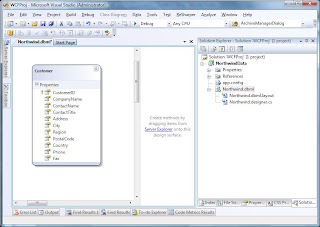
2. Next, we add a dbml file to the project by going to "Add New" and selecting the "LINQ to SQL Classes" entry and call it Northwind.dbml. Then use Server Explorer to navigate or connect to your SQL Server and drag the Customers table onto the dbml designer surface from the Northwind database.
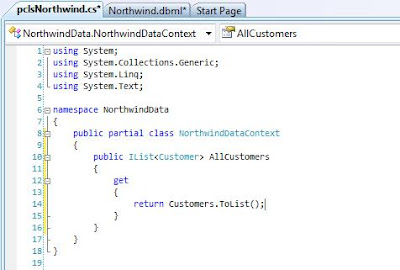
3. We now want to add a partial class so that we can add our own code to the generated DataContext. So add a new Class file and add the following code which will provide a method which returns all customers.
The WCF Service
4. So far so good. But now it's time to create our WCF Service component. So add a New Project to the solution and select WCF Service Library, we'll call it NorthwindService. We now need to make a few changes to the service framework that VS has created for us. First we need to add references to the NorthwindData project and to System.Data.Linq. Then we need to change the default Interface and Service names etc so that they are a bit more meaningful for our purposes. To do this we first rename the IService1.cs file to INorthwindService.cs (when you are asked to rename all references say Yes otherwise you will have to change the name of the actual interface yourself too.)
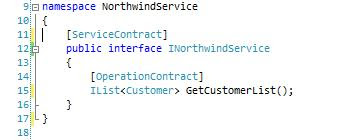
In WCF, Service interfaces are defined as "Service Contracts" and are marked with the ServiceContractAttribute, the methods on those interfaces are marked with the OperationContractAttribute. What this basically does is specify that the interfaces and marked operations define a contract that is upheld by any service which advertises itself as implementing that interface. If you've done much work with web services then you'll be quite at home with this concept as what it is effectively doing is decorating the interface so that our service can advertise and describe itself in a way synonymous with the WSDL approach. At the moment we're only interested in returning one list of Customers so our contract is relatively simple. The interface should be defined as follows:
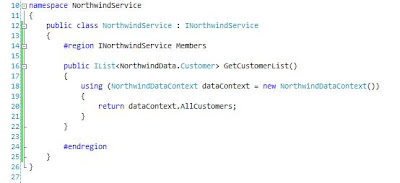
5. The next simple step is to provide an implementation of the interface in our component, so we rename Service1.cs to NorthwindService.cs (again allow VS to rename all references etc) and change the implementation code to the following:
There are various possible solutions to this, many of which look promising at the start but ultimately end up being dead ends or not really practical. One approach that I have been able to get to work is outlined below. What we're going to do in this first part is simply create aWCF Service component which will return a list of Customers from the Northwind database and consume that component in a simple client.
The Data Component
1. To start, we fire up Visual Studio 2008 and create an empty Solution. To that we want to add a Class Library project which we'll call NorthwindData.
2. Next, we add a dbml file to the project by going to "Add New" and selecting the "LINQ to SQL Classes" entry and call it Northwind.dbml. Then use Server Explorer to navigate or connect to your SQL Server and drag the Customers table onto the dbml designer surface from the Northwind database.

3. We now want to add a partial class so that we can add our own code to the generated DataContext. So add a new Class file and add the following code which will provide a method which returns all customers.

The WCF Service
4. So far so good. But now it's time to create our WCF Service component. So add a New Project to the solution and select WCF Service Library, we'll call it NorthwindService. We now need to make a few changes to the service framework that VS has created for us. First we need to add references to the NorthwindData project and to System.Data.Linq. Then we need to change the default Interface and Service names etc so that they are a bit more meaningful for our purposes. To do this we first rename the IService1.cs file to INorthwindService.cs (when you are asked to rename all references say Yes otherwise you will have to change the name of the actual interface yourself too.)
In WCF, Service interfaces are defined as "Service Contracts" and are marked with the ServiceContractAttribute, the methods on those interfaces are marked with the OperationContractAttribute. What this basically does is specify that the interfaces and marked operations define a contract that is upheld by any service which advertises itself as implementing that interface. If you've done much work with web services then you'll be quite at home with this concept as what it is effectively doing is decorating the interface so that our service can advertise and describe itself in a way synonymous with the WSDL approach. At the moment we're only interested in returning one list of Customers so our contract is relatively simple. The interface should be defined as follows:

5. The next simple step is to provide an implementation of the interface in our component, so we rename Service1.cs to NorthwindService.cs (again allow VS to rename all references etc) and change the implementation code to the following:

6. Finally to make our service useable, we need to update the config file so that the changes we have made to the names of the interfaces etc are registered correctly when the WCF Service is hosted. Open the App.Config file and change the contents to match the following:
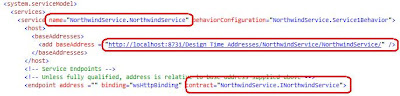
7. At this point, we only have one more tiny problem with our service. In point 4 we learned that interfaces exposed by WCF services specify a "contract" and this is also extended to any data objects which are passed through that interface, this is done using the DataContractAttribute (and the associated other attributes which define the members on the entity class.) So how do we get the entity objects generated by the IDE to be decorated with the required interfaces. This took a considerable amount of digging but in the end turned out to be a remarkably simple task. If we go back to our NorthwindData project and go to the properties of the dbml in the designer we can see a property called Serialization Mode. All we have to do is change the setting to "Unidirectional".
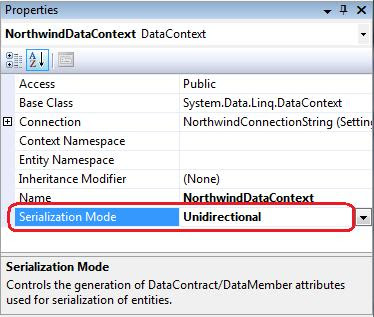
What this then does is automatically marks any of the entities generated from the dbml with the DataContract attributes.

It also means that the data definition of the entities can be included in the service definition of the interface contract. In a practical sense what this does is allow us to add a reference to the service and Visual Studio 2008 (utilising svcutil.exe under the hood) will read the metadata for the service and generate a client-side service proxy containing definitions of the LINQ entities for us.
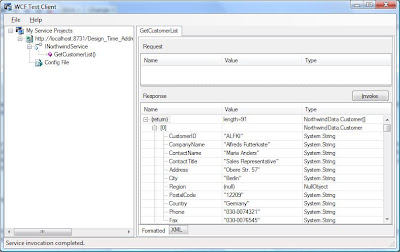
8. Let's test our service. Right-click on the NorthwindService project and select "Debug->Start New Instance..." This should force a compile and run the WCF Service which will be hosted by default in the "WCF Service Host" application which will place an icon in the notification area. If the service has been configured correctly the WCF Test Client should launch and after a second or so your service should be loaded into the tree view on the left. You can then expand the tree nodes to see the structure of the Service Interface and double click on the "GetCustomerList()" node. This will open a tab on the right which has an "Invoke" button which, when clicked, will call the method on the service and display the results in the lower box. As you can see below, the call returned 91 customer entries.
The Simple Client
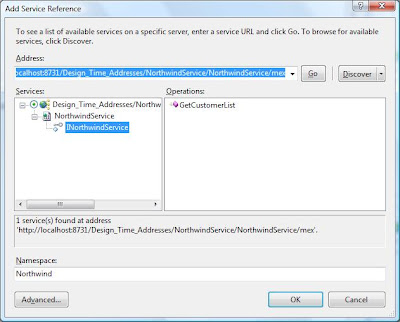
8. To create our simple client we'll add a console application project to our solution. This will serve our purposes in Part 1 as we're just interested in getting a list of customers back from the database but in future parts I hope to create a more complex and useable client using WPF. Add a console project called SimpleClient then right click on the References node in Solution Explorer and select "Add Service Reference..." If everything has gone right, you should be able to click the "Discover" button and the service details should appear in the tree on the left. When you expand the node, the service is instantiated and you can navigate to the interface definition. Before we commit the reference, change the Namespace entry at the bottom to Northwind. Finally, by default collections appear in the proxy as arrays, to make them a List as defined in the interface we need to click on the "Advanced..." button and change the "Collection Type:" dropdown to "System.Collections.Generic.List".
9 Click OK in the dialog, and the service reference will be added to the project. We can then add the following code to the Main method in Program.cs:
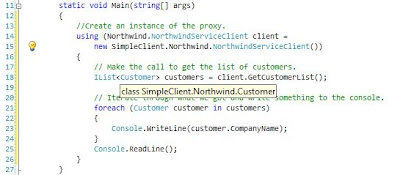
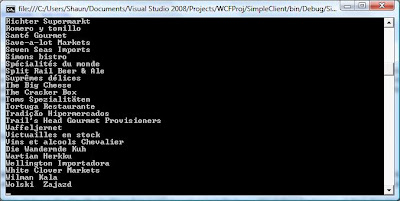
To test the simple application, ensure an instance of the service is running in the WCF Test Client (if one isn't, then right click the service project and select "Debug->Start New Instance".) then start an instance of the console application. All things being well, you should have a console window with a list of Northwind customers displayed.
Summary
So this is where we'll leave it for now. What we've achieved is fairly simplistic but what we have is an overall framework upon which we can build more complex behaviours such as updates and creation.

7. At this point, we only have one more tiny problem with our service. In point 4 we learned that interfaces exposed by WCF services specify a "contract" and this is also extended to any data objects which are passed through that interface, this is done using the DataContractAttribute (and the associated other attributes which define the members on the entity class.) So how do we get the entity objects generated by the IDE to be decorated with the required interfaces. This took a considerable amount of digging but in the end turned out to be a remarkably simple task. If we go back to our NorthwindData project and go to the properties of the dbml in the designer we can see a property called Serialization Mode. All we have to do is change the setting to "Unidirectional".

What this then does is automatically marks any of the entities generated from the dbml with the DataContract attributes.

It also means that the data definition of the entities can be included in the service definition of the interface contract. In a practical sense what this does is allow us to add a reference to the service and Visual Studio 2008 (utilising svcutil.exe under the hood) will read the metadata for the service and generate a client-side service proxy containing definitions of the LINQ entities for us.
8. Let's test our service. Right-click on the NorthwindService project and select "Debug->Start New Instance..." This should force a compile and run the WCF Service which will be hosted by default in the "WCF Service Host" application which will place an icon in the notification area. If the service has been configured correctly the WCF Test Client should launch and after a second or so your service should be loaded into the tree view on the left. You can then expand the tree nodes to see the structure of the Service Interface and double click on the "GetCustomerList()" node. This will open a tab on the right which has an "Invoke" button which, when clicked, will call the method on the service and display the results in the lower box. As you can see below, the call returned 91 customer entries.

The Simple Client
8. To create our simple client we'll add a console application project to our solution. This will serve our purposes in Part 1 as we're just interested in getting a list of customers back from the database but in future parts I hope to create a more complex and useable client using WPF. Add a console project called SimpleClient then right click on the References node in Solution Explorer and select "Add Service Reference..." If everything has gone right, you should be able to click the "Discover" button and the service details should appear in the tree on the left. When you expand the node, the service is instantiated and you can navigate to the interface definition. Before we commit the reference, change the Namespace entry at the bottom to Northwind. Finally, by default collections appear in the proxy as arrays, to make them a List

9 Click OK in the dialog, and the service reference will be added to the project. We can then add the following code to the Main method in Program.cs:

To test the simple application, ensure an instance of the service is running in the WCF Test Client (if one isn't, then right click the service project and select "Debug->Start New Instance".) then start an instance of the console application. All things being well, you should have a console window with a list of Northwind customers displayed.

Summary
So this is where we'll leave it for now. What we've achieved is fairly simplistic but what we have is an overall framework upon which we can build more complex behaviours such as updates and creation.
Subscribe to:
Posts (Atom)